Move data
Moving data from the source to the destination database is done using logical replication. This is an online operation, and doesn't require a maintenance window or pausing query traffic.
The underlying mechanism is very similar to Postgres subscriptions, with some improvements, and happens in two steps:
| Step | Description |
|---|---|
| Copy data | Copy data from all tables in the publication to the destination database. |
| Stream row changes | Stream row changes in real-time, keeping both source and destination databases in-sync. |
Once the replication stream synchronizes the two database clusters, the data on the destination cluster will be identical to the source cluster with a few milliseconds of delay.
Performing the move
Moving data can be done in one of two ways:
- Using an admin database command
- Using a CLI command
Admin database command
The admin database provides a way to execute commands, without having to spawn an independent PgDog process. To move data and replicate rows from the source database to the destination, you can run the following command:
This will spawn a background task that will copy all tables in the publication to the destination database, while redistributing rows between shards. Once the copy is complete, PgDog will proceed to stream row changes, keeping the two databases in close synchronization.
Example
To copy data from database "prod" to database "prod_sharded" and the "all_tables" publication, execute the following command:
The name of the replication slot will be automatically generated.
CLI
PgDog has a command line interface you can call by running it directly:
Required (*) and optional parameters for this command are as follows:
| Option | Description |
|---|---|
--from-database* |
Name of the source database cluster. |
--to-database* |
Name of the destination database cluster. |
--publication* |
Name of the Postgres publication for tables to be copied and sharded. It should exist on the source database. |
--replication-slot |
Name of the replication slot to use (and create if it doesn't exist) for syncing real-time changes. |
--replicate-only |
Don't copy data, just stream changes from the replication slot. |
--sync-only |
Perform the initial data sync only and exit. |
How it works
The first thing PgDog will do when data sync is started is create a replication slot on each primary database in the source cluster. This will prevent Postgres from removing the WAL, while PgDog copies data for each table to the destination.
Next, each table will be copied, in parallel, to the destination database, using sharded COPY. Once that's done, table changes are synchronized, in real-time, with logical replication from the replication slot created earlier.
The whole process happens entirely online, and doesn't require database reboots or pausing writes to the source database.
Replication slot
PostgreSQL replication works on the basis of slots. They are virtual annotations in the Write-Ahead Log which prevent Postgres from recycling WAL segments and deleting the history of changes made to the database.
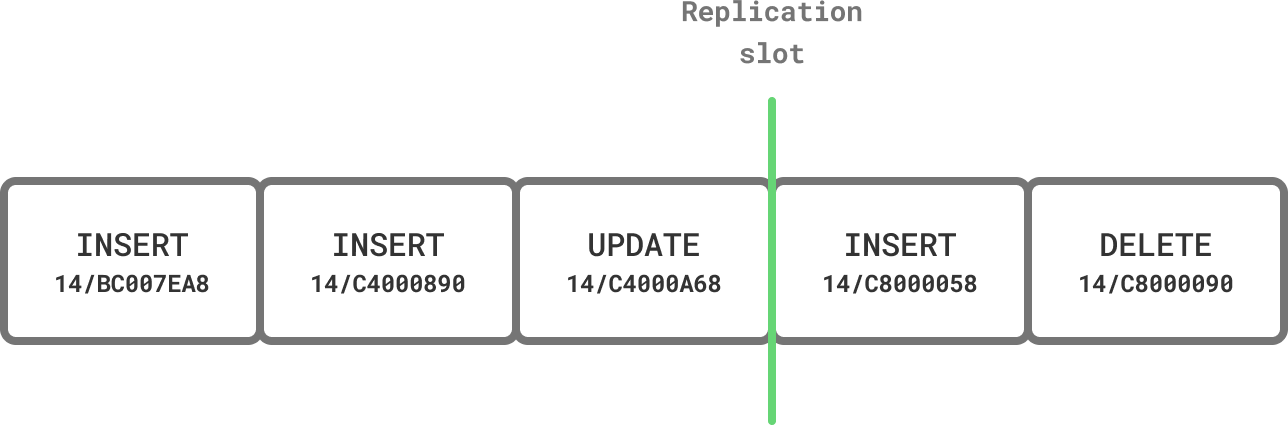
With logical replication, any client that speaks the protocol (like PgDog) can connect to the server and stream changes made to the database, starting at the position marked by the slot.
Before copying table data, we create a slot to mark a consistent starting point for our replication process. The slot is permanent, so even if resharding is interrupted, Postgres won't lose any of the WAL segments we need to resume it.
Unused replication slots
Since permanent replication slots are not automatically removed by Postgres, if you choose to abort the resharding process, make sure to manually drop the replication slot to prevent excessive WAL accumulation on the source database.
Once the slot is created, PgDog starts copying data from all tables in the publication, and resharding it in-flight.
Copying data
Tables are copied from source to destination database using standard PostgreSQL COPY commands, with a few improvements.
Parallelization
If you are running PostgreSQL 16 or later and have configured replicas on the source database, PgDog can copy multiple tables in parallel, dramatically accelerating this process.
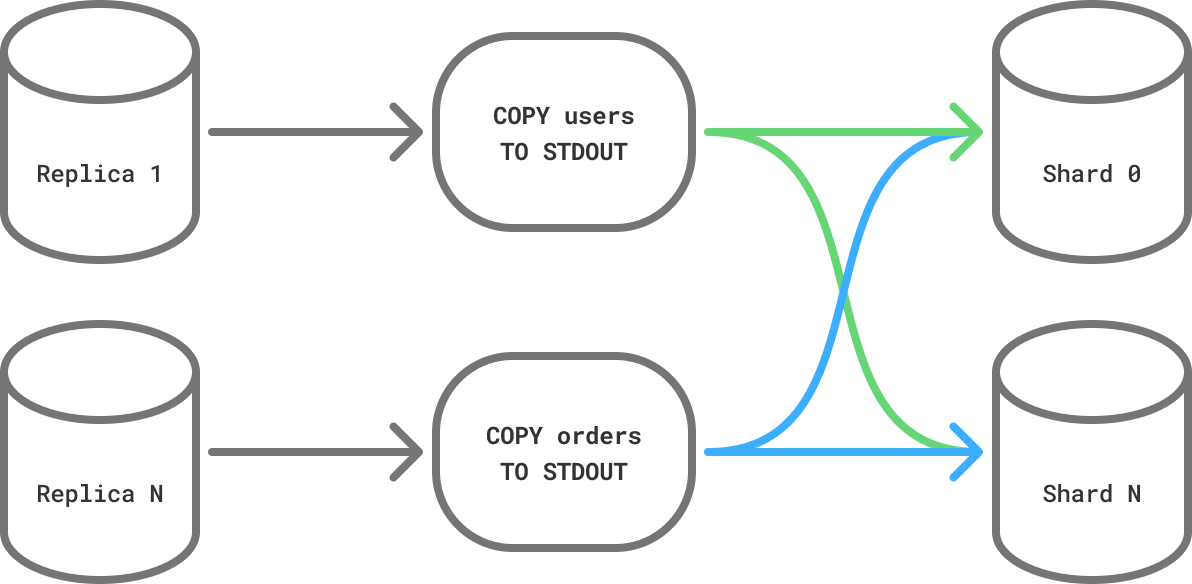
To set this up, make sure to add your read replicas to pgdog.toml, for example:
[[databases]]
name = "source"
host = "10.0.0.1"
role = "replica"

[[databases]]
name = "source"
host = "10.0.0.2"
role = "replica"
PgDog will distribute the table copy load evenly between all replicas in the configuration. The more replicas are available for resharding, the faster it will complete.
Dedicated replicas
To prevent the resharding process from impacting production queries, you can create a separate set of replicas just for resharding.
Managed clouds (e.g., AWS RDS) make this especially easy, but require a warm-up period to fetch all the data from the backup snapshot, before they can read data at full speed of their storage volumes.
To make sure dedicated replicas are not used for read queries in production, you can configure PgDog to use them for resharding only:
Binary COPY
PgDog uses the binary COPY format to send and receive data, which has been shown to be consistently faster than text, because it avoids the (de)serialization overhead of sending tuples in text form. PgDog decodes tuples in-flight and splits them evenly between destination shards, using the sharded COPY implementation.
Binary compatibility
While the data format used by PostgreSQL databases hasn't changed in decades, binary COPY sends rows exactly as they are stored on disk.
Therefore, sending binary data between two PostgreSQL databases running different versions of Postgres, however unlikely, could result in incompatibilities. We recommend to not change major versions of the server while resharding.
Once all tables are copied and resharded on the destination database cluster, PgDog will begin streaming real-time row updates from the replication slot.
Integer primary keys
If your primary keys are using the INTEGER data type (like in older Rails versions, for example), PgDog will automatically migrate them to use BIGINT during the resharding process. This is required because PgDog's unique ID generation function, which replaces sequences in sharded databases, produces 64-bit integers.
If this is the case, the binary COPY will not work, and you need to use text copy protocol instead. This can be configured in pgdog.toml:
Monitoring progress
The table copies can take some time and PgDog provides a real-time view to monitor the progress in the admin database:
-[ RECORD 1 ]-------+--------------------------------------------------
 schema              | public
 table               | orders
 status              | running
 rows                | 845000
 rows_human          | 845,000
 bytes               | 124500000
 bytes_human         | 118.73 MB
 bytes_per_sec       | 4150000
 bytes_per_sec_human | 3.96 MB
 elapsed             | 00:00:30:000
 elapsed_ms          | 30000
 sql                 | COPY public.orders (id, user_id, total, created_at)
Streaming updates
Once tables are copied over to the destination database, PgDog will stream any changes made to those tables from the replication slot created in the previous step. If it took a while to copy tables and the source database received a large volume of writes, this process could take some time.
You can check on the streaming process and estimate its ETA by querying admin database:
Some of this information can be obtained by querying the source database as well, for example:
The replication delay between the two database clusters is measured in bytes. When that number reaches zero, the two databases are byte-for-byte identical, and traffic can be cut over to the destination database.Next steps
Traffic cutover
Switch live traffic to the destination database.